PINNACLE

All modules

Eleven modules, from the first drawing to the closed books, in one package. 92 features are ready today. Add the ones you want to your demo list.

The eleven modules

Take the drawings off, price them and build the estimate in one place.
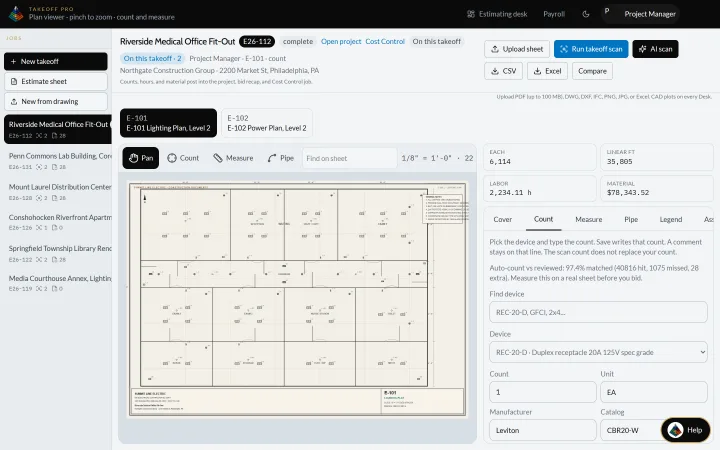
Pinnacle Takeoff on sample job E26-112, Riverside Medical Office Fit-Out: the E-101 lighting plan open in the plan viewer with pan, count, measure and pipe tools, and the device count, labor hours and material totals beside the sheet
Real Pinnacle screen · sample data

Ready today

  • Takeoff from PDF, image or Excel plan sheets
  • Count, measure, pipe and wire runs on the sheet
  • Symbol key with auto-count and an accuracy check
  • Compare drawing revisions with an overlay
  • Set the scale from a known length or the sheet
All 11 features
  • Assemblies and shop kits that explode into parts
  • Labor units and labor factors you can edit
  • Parts catalog, distributor and manufacturer lists
  • Material prices three ways: your supply houses, your own pricing-service account, or the built-in online price search
  • Vendor price book compare with margin impact on open estimates
  • Export the takeoff as CSV or Excel

Early access

  • AI takeoff counts that you review
  • Trade content packs for every trade
Every job in one hub, from the first drawing to the closeout file.

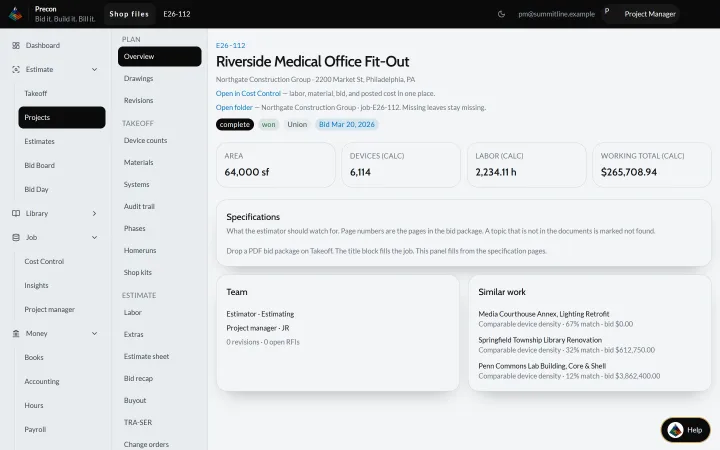
Pinnacle project overview for sample project E26-112, Riverside Medical Office Fit-Out: area, device count, labor hours and working total, plus specifications, team and similar past work
Real Pinnacle screen · sample data

Ready today

  • Project hub with overview, team and similar past work
  • Drawings, revisions and what each addendum added
  • Device counts, materials with waste, systems and phases
  • Scope: inclusions, exclusions and assumptions
  • Extras and add-alternates kept outside the base bid
All 12 features
  • RFI and submittal logs
  • Job photos from the phone
  • Job file sections for specs, addenda, POs and pay apps
  • Activity log and risk flags
  • Mark an estimate won to open the job with the next number
  • Bid emails filed from a jobs@ mailbox
  • Project manager desk

From the invitation to the number you turn in.

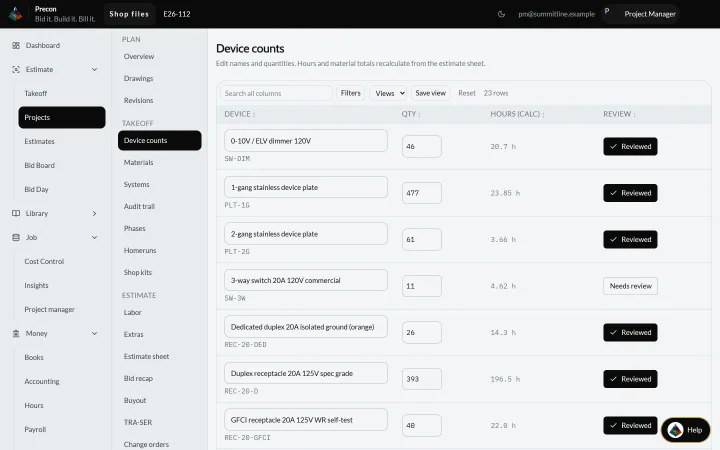
Pinnacle Precon device counts for sample project E26-112: estimate lines for dimmers, device plates, switches and receptacles, each with quantity, calculated hours and review status
Real Pinnacle screen · sample data

Ready today

  • Bid board of forwarded invitations
  • Bid Day workbook: markup, overhead, profit, bond and permits
  • Lock the bid for submission
  • Bid recap with what-if and bid hours vs posted hours
  • Freeze the bid onto Cost Control
All 9 features
  • Buyout: compare supplier quotes and create the PO
  • Bid package PDF with a crew estimate
  • Proposal builder and archive
  • Bid calendar on the dashboard

Early access

  • Freeze a bid and compare it to live prices
  • Assemble GC bid packages

Know where every job stands against the bid, every day.

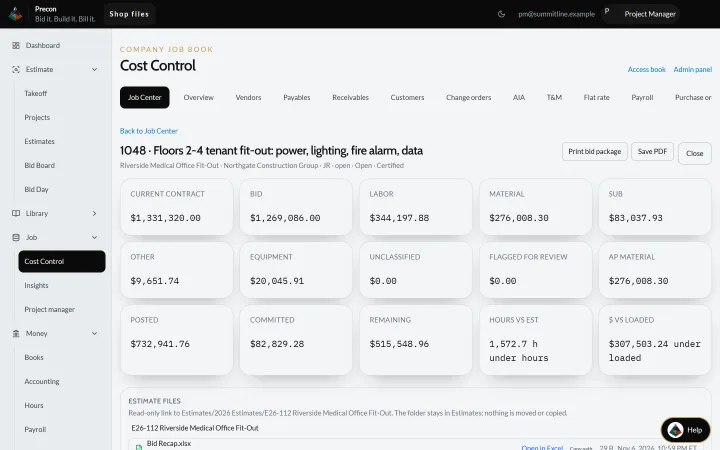
Pinnacle Cost Control on sample job 1048: current contract, bid, labor, material, sub, other and equipment cost, then posted, committed and remaining amounts and hours against the estimate
Real Pinnacle screen · sample data

Ready today

  • Job Center: bid, posted, remaining and phase production
  • Purchase orders count as committed; receiving posts material
  • Change orders that freeze onto the job
  • T&M tickets signed in the field
  • Vendors, payables, receivables and customers
All 11 features
  • Match vendor invoices to open POs and flag price drift
  • Invoice inbox that proposes the job folder
  • Job review that catches duplicates
  • Insights: bid vs actual, crew mix and company health
  • Dispatch board for who is on which job
  • Service flat-rate book

Early access

  • Cost to complete on each job
  • Change-order impact on the original bid
  • Job scheduling board

Pay apps from the schedule of values, and the cash desk behind them.

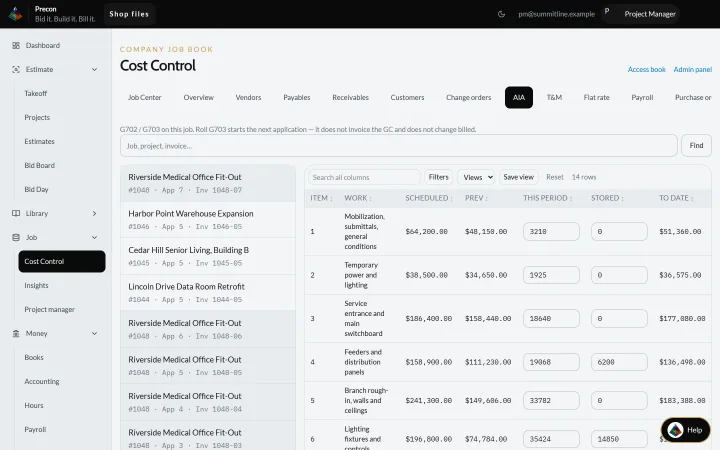
Pinnacle AIA billing on sample job 1048, application 7: the G703 schedule of values with scheduled value, previous, this period, stored and to-date amounts on each line
Real Pinnacle screen · sample data

Ready today

  • AIA G702/G703-style pay apps on every job
  • Stored materials and close the period
  • Post the pay app: billed, retainage and what the GC still owes
  • Retainage tracked on billing and aging
  • AR billing, cash receipts, AR and AP aging
All 9 features
  • AP invoices, payments and a 1099 report
  • Cash desk: bank books, Positive Pay and vendor ACH files
  • Payroll ACH with a second login to release it
  • Lien waiver and pay app templates

Early access

  • Take ACH or card on AR invoices
  • Flag COI expiry and missing lien waivers

Hours from the field, payroll in the office, one book.

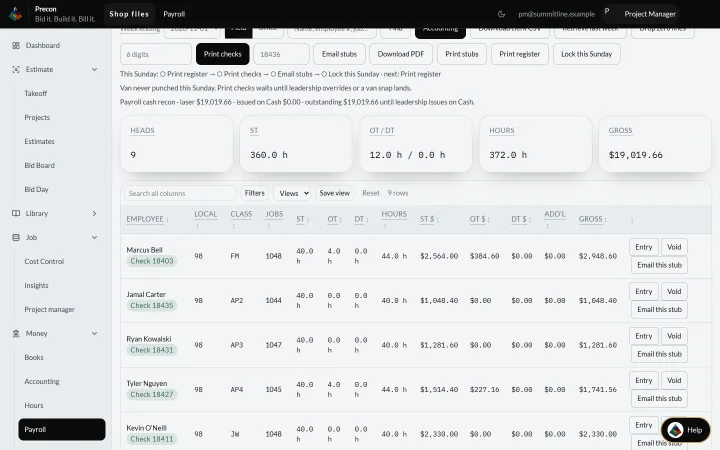
Pinnacle Payroll Center for the sample week ending 2026-11-01: 9 crew with straight and overtime hours, total hours, gross pay and check numbers
Real Pinnacle screen · sample data

Ready today

  • Hours from your phone: My Day, clock in, ST, OT and DT
  • Phone app on the home screen, with Microsoft sign-in
  • Paper time slips photographed to the office queue
  • Payroll Center: checks, stubs and week totals
  • Certified payroll WH-347 with the statement of compliance
All 11 features
  • Union ST, OT, DT and fringes by local, with remittance print
  • Phone vs office hours exceptions
  • Deductions and garnishments
  • Year-to-date hours and earnings
  • SSNs and bank numbers encrypted and masked
  • Payroll, built today for a single shop

Early access

  • Lock payroll when the period closes, for any shop
  • Prevailing wage burden on job cost
  • Clock in by GPS near the job site

WIP, job P&L and the books, straight from the jobs.

Ready today

  • WIP schedule with fading jobs in red
  • Job P&L and over/under billing
  • Trial balance, P&L and balance sheet
  • Posted journals: mistakes are reversed, never edited
  • Close the week and lock the month
All 9 features
  • Copper and conduit price watch vs the bid
  • Truck and equipment hours on the job
  • Email the books and print the accounting pack
  • Export journals as CSV or QuickBooks IIF

Early access

  • Cash outlook thirteen weeks out

Ask about a job or a desk and get answers with their sources.

Ready today

  • Ask about this desk, with suggested questions
  • Shop chat that cites the file, or says it is unverified
  • AI scan of a drawing sheet in takeoff
  • Project assistant for scope and missing items
  • Answers from the user manuals
All 7 features
  • Search across the shop files
  • Choose local or outside OCR for drawing scans

Ask out loud: job cost, documents, hours. It reads, it never pays or sends.

Whole module in Early access

  • Press to talk, with an answer card that shows the source
  • Looks up jobs, job cost, documents and payroll
  • Never pays, sends, approves or deletes
  • Sees only what your login can see
  • Understands spoken job numbers
  • Coming to Precon

One login, your company kept separate, and every change logged.

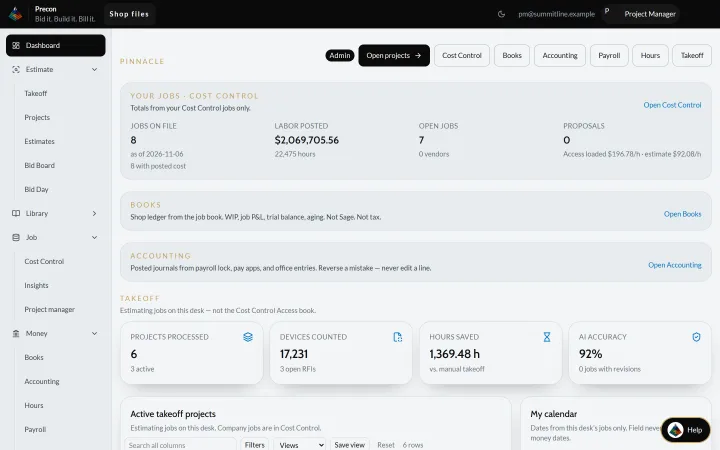
Pinnacle dashboard on the sample company: Cost Control totals for the jobs on file, labor posted and open jobs, shortcuts to the books and accounting, takeoff stats and the active takeoff projects list
Real Pinnacle screen · sample data

Ready today

  • Two-factor sign-in and passkeys
  • Microsoft work-account sign-in
  • Each company kept separate in the database
  • Access by role and per person, with a change log
  • Send security events to your SIEM
All 13 features
  • Shop API with scoped keys
  • Turn modules on or off per company
  • Your logo, light and dark appearance
  • Read-only job file browsers that open Microsoft 365 or Acrobat
  • Job desk: notes, RFIs, daily reports and punch items
  • Home dashboard with bids, risk flags and open RFIs
  • Windows desktop and network install
  • Backups and data retention

Reach the office from the job site or from home.

Whole module in Early access

  • Reach the office desk remotely
  • Hours and daily logs offline on the phone
  • Host on your server or ours
  • Spanish screens
  • Native iPhone and Android apps

Request a demoAdd the modules you want with "+ Add to my demo", and we will show you exactly those.

Early access items are part of the Pinnacle product vision.

How to get Pinnacle

  1. Pick what you needAdd modules to your demo list with "+ Add to my demo". Every module is part of one Pinnacle package, and each one can be switched on or off for your company.
  2. See it on your kind of workRequest a demo. We walk through exactly the modules on your list, in your trade.
  3. Get set up with usWe help you bring your jobs in and get your office running. Questions first? Email hello@ibuildyouwin.com.
Get early access